
Nursa
Nursa INCMedical
4.2477.00 Reviews
- Version
- 5.1.231
- Installs
- 100.00K
- Age Rating
- Everyone
Screenshots
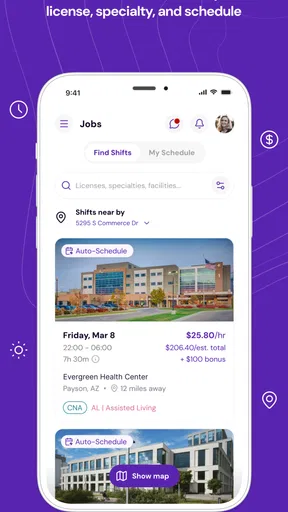
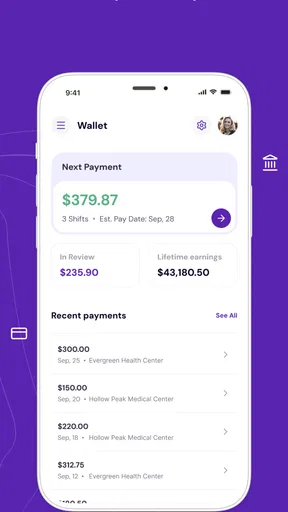
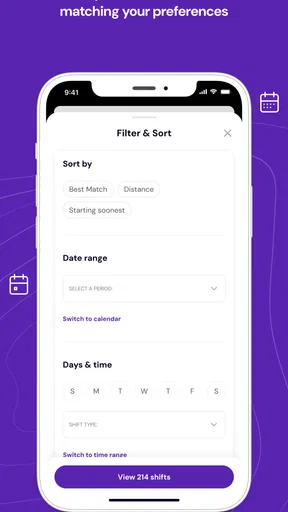
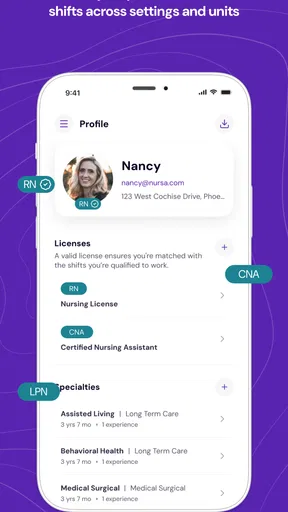
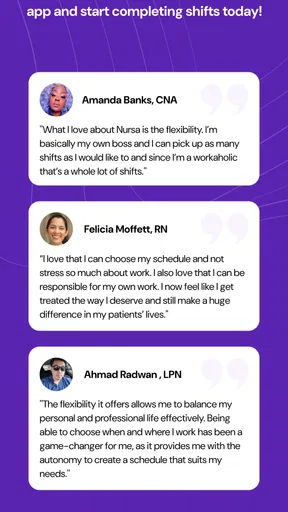
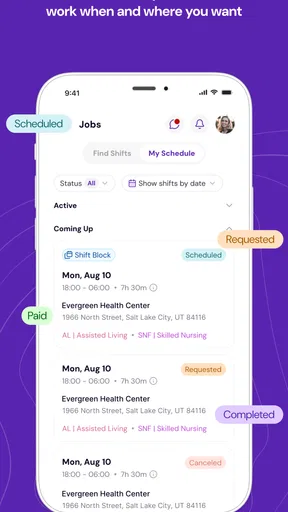
Our Review of Nursa
 Analysis by Appyee
Finding a nursing shift is not quite the same as ordering a meal or checking a social feed. The decision can affect your income, commute, preparation, and professional responsibilities, so the app you use needs to be practical when you are moving between facilities or checking opportunities during a busy day. I spent time looking at how Nursa fits that situation, and my impression is that it is most useful as a focused marketplace for nurses who want to discover and fill available shifts from a phone.
Nursa is a free medical app from Nursa INC, designed around connecting nurses with shifts through a healthcare staffing marketplace. Its audience is fairly clear: nurses and other eligible healthcare workers who want an alternative to relying entirely on a hospital scheduler, staffing agency phone call, or scattered messages. It is not trying to be a general clinical reference tool, a patient-management system, or a replacement for workplace communication.
That narrow purpose is a strength. I did not have to interpret a crowded collection of unrelated healthcare tools to understand the central job of the app. The important question is whether it helps you find a suitable shift quickly and confidently. The answer depends heavily on your location, the availability shown to you, and the quality of your mobile connection, but the overall concept makes sense for flexible healthcare work.
How the marketplace feels when you are actually trying to find work
The first thing I would tell a friend is to treat Nursa as a shift-discovery tool, not as a guarantee of immediate work. A marketplace can only be useful when the opportunities displayed match your credentials, travel range, schedule, and preferred type of care. If those factors line up, browsing from a phone is much more convenient than waiting for a staffing coordinator to call with one option at a time.
The app’s store summary describes its purpose directly: finding and filling nursing shifts through the Nursa healthcare staffing marketplace. That wording matters because it suggests an active workflow rather than a passive list of job advertisements. You are looking for shifts that fit a particular moment, and the value comes from being able to act while your schedule is still open.
In my experience, the best way to use an app like this is with a clear personal filter before opening it. Know the days you can work, the maximum journey you will accept, and the kinds of assignments that make sense for your experience. Without that preparation, it is easy to spend time examining opportunities that look attractive until you consider transport, handover time, or the practical demands of the facility.
A realistic example would be a nurse whose regular rota leaves an unexpected gap later in the week. Instead of sending several messages and waiting for replies, the nurse can check the marketplace from a phone, review suitable possibilities, and decide whether one fits the available window. The advantage is not simply speed. It is the ability to compare an open shift with your own circumstances before committing.
That convenience comes with a trade-off. A staffing marketplace is not the same as having a familiar scheduler who already knows your preferences and history. You may need to pay closer attention to the details of each opportunity and make your own judgement about whether the shift is genuinely worthwhile. I would not use it casually or accept something just because it appears at a convenient time.
Why a live connection matters at the important moments
Nursa is most dependent on connectivity when you are browsing current opportunities and trying to complete an action. A marketplace has little practical value if the information on screen is old, incomplete, or unable to refresh. For that reason, I would use it with a dependable mobile connection or Wi-Fi whenever I am making a decision that affects my working day.
This is especially important when checking the app between clinical responsibilities. A weak signal can turn a quick review into repeated loading, and a shift that was visible a moment ago may need to be checked again before you rely on it. I would avoid treating a screen that has been sitting open as proof that an opportunity is still available. Refreshing at the point of decision is a sensible habit.
Connectivity also shapes the emotional experience. When the app responds promptly, the marketplace feels immediate and useful. When the connection drops during a time-sensitive search, the uncertainty becomes more frustrating because the whole purpose is to make a current staffing decision. This is not a criticism unique to Nursa; it is a basic consequence of using a live staffing service on a mobile device. Still, it affects whether the app feels dependable in the situations where you need it most.
I would also avoid making a final decision while standing in a place with unreliable reception. A hospital basement, a large building with thick walls, or a car park can create a misleading impression that the app is failing. Moving to a more open area or switching to a stable Wi-Fi network may solve the problem, but that takes time. If a shift is important, I would confirm the details before leaving a reliable connection.
Using it during commutes, breaks, and changing schedules
The mobile format makes particular sense for nurses because availability is rarely managed from a desk. You might check for work before leaving home, during a permitted break, or after a shift when you know your next few days have changed. The app’s value is therefore tied to how well it fits into short, interrupted moments rather than long browsing sessions.
I would use it in two passes. The first pass would be quick: identify whether anything potentially suitable is available. The second would happen when I have enough time and a stable connection to inspect the opportunity properly. This avoids making a rushed commitment simply because a shift appeared while I was walking between tasks.
Travel is where mobile convenience can become either a strength or a weakness. Checking a shift while already near a facility may make the opportunity more practical than it looked from home. On the other hand, accepting work without considering the full journey can turn a seemingly useful shift into a poor financial and personal choice. Nursa can help surface possibilities, but it cannot make that calculation for you.
Another useful habit is to keep the app separate from urgent workplace communication. If you are already dealing with a handover, a patient-related responsibility, or a manager’s message, shift browsing should wait. The marketplace is designed to support staffing decisions; it should not compete with immediate clinical duties. I see this as an important boundary for any healthcare worker using a phone during a demanding day.
The mobile setting also makes privacy awareness worthwhile. Checking a staffing marketplace in a public waiting area is different from discussing a patient or displaying workplace information, but I would still keep the screen discreet. A phone can be lost, borrowed, or viewed over your shoulder. I would not leave the app open unattended, and I would avoid mixing shift decisions with any sensitive workplace conversation on speakerphone.
What to do when a connection or session fails
Failure recovery is one of the less glamorous parts of a staffing app, but it matters more here than in an entertainment app. If a page does not load, my first step would be to avoid repeatedly tapping the same control. I would check the connection, wait briefly, and then reopen the relevant view. Repeated attempts during an unstable connection can create confusion about whether an action went through.
After any interruption, I would verify the current state rather than assuming success. If I had been reviewing a shift, I would reopen it and check the details again. If I had been trying to fill one, I would look for clear confirmation inside the app before changing my plans. That extra check may feel slow, but it is safer than relying on a frozen screen or a notification that never arrived.
This is one of the most important practical tips I can offer: never plan your day around an interrupted action until you have confirmed the result. A dropped connection can leave you unsure whether the problem was only visual or whether the request itself was affected. Confirmation is particularly important when travel, childcare, or another work commitment depends on the outcome.
If the app appears stuck, I would move from mobile data to Wi-Fi, or the other way around, when possible. I would also close unrelated apps that are consuming the connection or making the phone sluggish. These are simple steps, but they are more useful than immediately blaming the marketplace. The same approach helps distinguish a local phone problem from a broader service issue.
Keeping the application current is another sensible part of recovery. Nursa’s current version is 5.1.231, and the app supports Android 7.0 and later. That makes it accessible to many older Android phones, but compatibility alone does not mean every older device will feel equally quick. If the phone has limited storage, an aging battery, or a crowded background workload, browsing a live marketplace may feel less reliable than it does on a newer handset.
I would also keep a separate personal record of commitments once they are confirmed. That does not replace checking the app, but it gives you a practical reference when you are travelling or when the connection becomes unreliable later. A calendar entry with the facility, time, and travel plan can prevent a confirmed shift from being forgotten simply because you cannot immediately reopen the app.
Being careful with mobile data and battery
Because the service is built around current staffing opportunities, I would not leave it open continuously in the background just to watch for changes. That approach can waste battery and mobile data without improving your chances of finding a suitable shift. A more sensible routine is to open it when you know you are ready to search, use a stable connection, and close it when you have finished making a decision.
Wi-Fi is useful for longer browsing, especially if you are comparing several possibilities or reviewing information carefully. Mobile data is more convenient when you are away from home, but I would be selective about when I use it. If your plan is limited, avoid refreshing repeatedly in a weak-signal area, since the phone may work harder while trying to reconnect.
Battery management matters in healthcare work because the same phone may be needed for calls, messages, authentication, navigation, and workplace communication. I would not let a shift search drain the battery before a long journey. A short, deliberate check is better than keeping the marketplace open all day. A portable charger is useful for the overall workday, but it does not solve the problem of spending attention on the phone at the wrong time.
There is also a data-conscious decision beyond the phone bill: your time. A marketplace can encourage frequent checking because availability may change, but not every refresh is productive. I would set a few sensible checking windows around my actual availability instead of repeatedly looking whenever I feel uncertain. That makes the app a tool for planning rather than another source of distraction.
For nurses with a very restricted schedule, this approach is particularly important. If you can only work one narrow period, repeated browsing may produce little value. The app becomes more worthwhile when you have several realistic windows or are comfortable travelling to more than one suitable workplace. That is a genuine trade-off: flexibility increases the possible usefulness of the marketplace, while strict constraints reduce the number of opportunities that can fit.
Who will benefit, and who should choose another route?
I think Nursa is a strong fit for nurses who want a more direct way to look for available shifts and who are comfortable making staffing decisions from a mobile device. It is also appealing to people who dislike waiting for a traditional agency to contact them with limited choices. The free price removes a barrier to trying the marketplace, and the Everyone content rating makes it broadly approachable as an app, although the professional responsibilities of the work itself obviously remain important.
The app has reached more than one hundred thousand installs, with an average rating of 4.2 from around one thousand nine hundred ratings and 477 reviews. Those figures suggest that it has attracted a meaningful user base and generally positive reception, while also reminding me not to treat it as universally perfect. Ratings can tell you that many people find an app useful; they cannot determine whether the available shifts suit your area, qualifications, or schedule.
I would be more cautious if you need a highly personal relationship with one staffing coordinator, want extensive workplace management tools, or expect every shift search to produce a match. In those situations, a conventional agency, direct employer relationship, or workplace scheduling system may be better. Nursa’s marketplace approach gives you more independence, but independence also means more responsibility for checking fit and following through.
I would also skip it as a primary solution if your work requires detailed clinical documentation, patient records, or communication with a care team. Nothing about its central purpose makes it a substitute for those systems. Its role is staffing access, not clinical workflow. Using the right tool for each job is especially important in medical settings.
My verdict on staying connected while using Nursa
After looking at the app through the lens of real mobile use, I see Nursa as a practical option for nurses who want to find and fill shifts without depending entirely on a traditional staffing routine. Its biggest advantage is the combination of a focused purpose and phone-based access. Its biggest limitation is that the experience is only as dependable as the current connection, the available opportunities, and your own ability to judge whether a shift works.
I would recommend installing it if you have genuine flexibility, a reliable phone connection, and the discipline to verify details before committing. Use Wi-Fi for careful browsing when possible, check important actions after interruptions, and do not let the app replace a calendar or your normal professional communication. Those habits make the marketplace more useful and reduce the risks created by rushed mobile decisions.
For me, the final judgement is positive but specific: Nursa is best as an additional route to nursing shifts, not as the only plan for your working life. It can make opportunities easier to discover in the moments when your schedule changes, but it cannot remove the need for professional judgement, travel planning, connection awareness, or confirmation. If that balance suits the way you work, this free medical app from Nursa INC is worth trying.
Verdict
Strengths of Nursa
- Fast access to nearby nursing shifts and healthcare jobs
- Flexible scheduling helps nurses choose suitable work opportunities
- Clear shift details make it easier to compare available assignments
- Useful for discovering short-term work without long application processes
- Supports professional networking within the healthcare community
Limitations of Nursa
- Availability depends heavily on your location and local healthcare demand
- Some shifts may require specific licenses, credentials, or experience
- Last-minute cancellations can affect your planned income and schedule
- The app may request extensive personal and professional information
- Payment timing and rates can vary between facilities and assignments
Similar Picks in This Category
View All
WebMD: Symptom Checker
WebMD, LLC4.1

Microphone Amplifier
DOSA Apps4.2

Anatomy Learning - 3D Anatomy
3D Medical OU4.5

Period Tracker and Calendar
SimpleInnovation4.9

GoodRx: Prescription Coupons
GoodRx4.8

CVS Health
CVS Pharmacy4.5
Frequently Asked Questions
What is Nursa, and who is the app designed for?
Nursa is a healthcare staffing platform designed primarily for nurses and other qualified healthcare professionals looking for flexible shifts, as well as healthcare facilities that need additional clinical staff. After creating a profile, eligible professionals can browse available shifts, review details such as location, pay, and requirements, and request or accept assignments through the app. Availability and supported roles may vary by region.
How do nurses find and book shifts through Nursa?
After completing registration and submitting the required professional information, users can search for nearby healthcare shifts using filters such as specialty, date, facility, and compensation. Each listing normally includes important assignment details before the user commits. Depending on the facility and shift, the booking process may involve an application, confirmation, or approval. It is important to check every requirement carefully before accepting.
What documents and qualifications are required to use Nursa?
Nursa generally requires healthcare professionals to verify their identity, license, certifications, work history, and other compliance documents before they can book shifts. Exact requirements depend on the role, facility, and local regulations. Some assignments may require additional credentials, immunization records, background checks, or specialty experience. Users should keep their documents current because expired information can limit access to available opportunities.
How and when are healthcare professionals paid for Nursa shifts?
Payment details can differ according to the assignment, facility, location, and the terms displayed in the app. Before accepting a shift, users should review the listed rate, payment conditions, and any applicable policies regarding timekeeping, cancellations, or disputes. Payment may depend on successfully completing the assignment and submitting accurate information. For the most reliable details, consult the current payment information shown in the app.
Is Nursa free to download, and is it available everywhere?
The Nursa app may be free to download, but access to shifts and platform services can depend on market availability, professional eligibility, and participating healthcare facilities. Not every city, specialty, or healthcare role is necessarily supported. Before downloading, users should confirm that Nursa operates in their area and that their profession is accepted. Standard mobile data charges may also apply when using the app.
